Table of Contents
TogglePaper drawings may look charming in old office cabinets, but modern engineering teams rarely enjoy spending nights fixing messy linework from scanned files. That is exactly where PDF to DWG conversion enters the conversation.
Design firms, fabrication plants, engineering agencies, and construction crews are constantly managing piles of locked files that need updates in drawing software. The big challenge is choosing between software-driven workflows and traditional human sketching techniques.
One approach provides lightning-fast delivery like a sports car on a highway, while the other acts like a careful craftsman checking every single line twice. Both options come with their own distinct advantages, drawbacks, and specific quirks.
Choosing the wrong path usually leads to incorrect scales, broken lines, and endless hours spent fixing the files. Picking the right approach keeps your budget safe, raises productivity, and avoids design delays before tight project deadlines start catching up with you.
Understanding PDF to DWG Conversion
When discussing a PDF to DWG services, it simply refers to changing locked print documents into editable vector formats that design applications can read. This process allows designers, draftspersons, site crews, and coordinators to modify old blueprints instead of recreating the whole layout from nothing.
The widespread need to convert PDF to DWG has surged lately since so many historical blueprints are stuck in flattened image formats. Renovation teams frequently inherit old sheets featuring barely visible scales, warped lettering, and tangled geometry. If you do not process these sheets correctly, making simple revisions becomes an absolute nightmare.
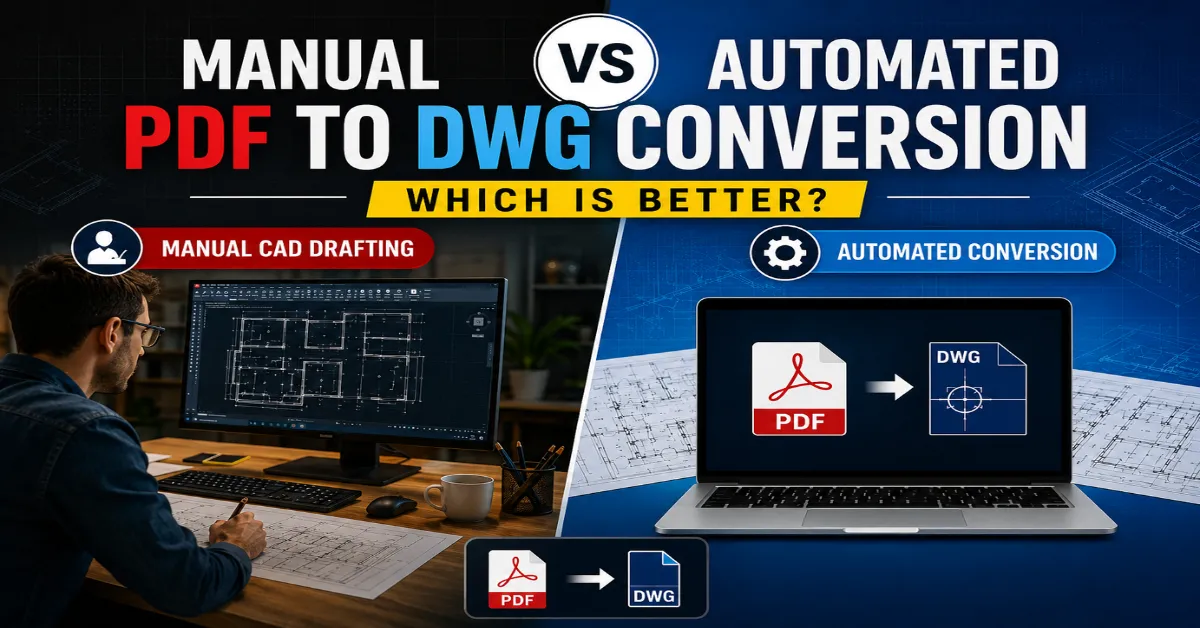
Looking at the main DWG conversion methods used across the market, you will find two paths: machine-driven processing and hands-on recreation. Automated PDF to CAD conversion relies on algorithms to guess vectors, line weights, and annotations instantly. On the flip side, manual PDF to CAD drafting relies on seasoned technical draftsmen who meticulously trace and build the file from scratch inside their workstations.
Interestingly, both methods solve the same problem while behaving completely differently. One acts like a fast-food drive-through. The other feels closer to a chef preparing a detailed meal from scratch.
Also read: Common Errors in PDF to CAD and How to Avoid Them
How Automated PDF to CAD Conversion Works
Program-based systems use specific processing engines that scan incoming sheets and try to map out flat imagery into vector paths. The workflow seems incredibly simple on paper—you just drop your document into the portal, hit a button, and watch a fresh file generate in moments.
Major design suites now come standard with native extraction tools, and standalone programs have also flooded the market. These utilities try to identify line patterns, arcs, solid fills, scale callouts, and font styles automatically.
The primary selling point for this approach is pure turnaround time. You can push massive stacks of sheets through the pipeline at once, which is great for firms managing highly standardized files.
Even so, automated CAD conversion limitations quickly show up when encountering dense layouts, as low-resolution scans throw off the recognition math and leave you with broken geometry.
Text overlaps geometry. Hatch patterns sometimes become chaotic collections of meaningless shapes. Even experienced CAD users occasionally stare at converted files, wondering whether the software had a rough morning.
Another challenge comes from raster-based PDFs. Since raster images contain pixels instead of vector data, automated tools must guess line positions during conversion. That guessing game rarely produces flawless results.
A quick overview explains the situation clearly:
Feature | Automated PDF to CAD Conversion |
Speed | Very fast |
Accuracy | Moderate |
Cleanup Required | Often high |
Cost | Lower initially |
Best For | Simple vector PDFs |
Risk of Errors | Medium to high |
Even with these drawbacks, utilizing automated PDF to CAD conversion works fine for rough mockups, high-volume archiving, or basic spatial outlines.
The rise of machine learning models has started reshaping this discipline as well. Next-gen platforms keep refining their pattern matching through neural networks and smarter vector detection, while detailed technical standards for file management remain accessible directly via official industry networks.
The Process Behind Manual PDF to CAD Drafting
Human-driven drafting goes in a completely opposite direction, bypassing heavy machine dependency to have expert modelers draw every element based on industry guidelines and real logic.
While this route feels slower at first, the boost in final file precision is massive. Professional drafters review dimensions, true up warped angles, organize the data structure correctly, and make sure callouts stay legible. Every element receives human attention rather than algorithmic guessing.
Manual drafting becomes especially valuable for:
- Old scanned blueprints
- Low-quality PDFs
- Complex architectural layouts
- MEP coordination drawings
- Manufacturing details
- Renovation documentation
Many engineering companies prefer manual PDF to CAD drafting because project mistakes become expensive very quickly. A wrongly converted dimension may not look dangerous on a screen, but construction errors on-site can trigger delays, rework costs, and frustrated stakeholders.
Manual drafting also supports better layer management. Script-based systems usually dump unrelated elements into a single chaotic layer group, whereas a human draftsperson builds a clean file architecture that makes future updates simple.
Another major advantage involves quality control. Manual teams review drawings carefully before final delivery. That review process helps eliminate duplicated lines, disconnected geometry, and scaling issues.
The downside, naturally, is time. Manual drafting requires skilled labor, careful checking, and more production hours. Costs often increase compared to automated workflows. Still, many companies view those costs as insurance against expensive downstream problems.
Raster vs Vector PDF Files: Why the Difference Matters
The conversation around PDF to DWG conversion becomes incomplete without discussing raster and vector PDFs. This distinction changes everything.
Vector PDFs contain mathematical line data. These files usually originate directly from CAD software. Automated tools handle them relatively well because geometry already exists digitally.
Raster PDFs behave differently. These files are essentially images made from pixels. Scanned paper drawings fall into this category. Automated conversion software struggles heavily with raster files because the system must interpret visual information rather than read existing geometry.
Imagine trying to trace a foggy road at midnight while wearing scratched glasses. That is basically how conversion software feels when handling poor-quality raster scans.
Here is a clearer comparison:
PDF Type | Characteristics | Conversion Difficulty |
Vector PDF | Sharp lines and editable geometry | Easier |
Raster PDF | Pixel-based scanned image | Difficult |
Hybrid PDF | Combination of both | Moderate |
Manual CAD drafting benefits become far more obvious when raster files enter the equation. Human eyes identify patterns, dimensions, and symbols better than most software tools, especially when dealing with damaged or unclear drawings.
Construction and renovation projects often involve archived raster documents. In those situations, manual drafting usually produces cleaner and more dependable DWG files.
Accuracy Comparison Between Manual and Automated Conversion
Accuracy sits at the heart of every PDF to DWG conversion discussion. Speed sounds attractive until wrong dimensions start creating project chaos.
Automated conversion tools perform reasonably well on clean vector drawings. Straightforward floor plans or mechanical layouts may convert with acceptable results. However, complex projects expose software limitations quickly.
Common automated CAD conversion limitations include:
- Misaligned dimensions
- Broken polylines
- Missing text
- Incorrect scaling
- Layer confusion
- Overlapping geometry
Messy automated files require extensive post-processing corrections, meaning teams often spend way more hours fixing a broken machine export than if they had just drafted it right the first day.
Going the manual route eliminates these headaches since eyes look over every single square inch. Experienced drafters comprehend building symbols, trade shorthand, and structural patterns that computer code still cannot reliably interpret.
A practical comparison illustrates the difference:
Criteria | Manual PDF to CAD Drafting | Automated PDF to CAD Conversion |
Dimensional Accuracy | High | Moderate |
Layer Organization | Excellent | Inconsistent |
Text Recognition | Reliable | Error-prone |
Complex Drawings | Strong performance | Weak performance |
Production Speed | Slower | Faster |
Accuracy matters most when drawings continue into fabrication, construction, or manufacturing workflows. Small conversion mistakes can multiply rapidly once contractors start relying on those files.
Speed and Productivity Considerations
No discussion about DWG conversion methods feels complete without addressing speed. Modern project schedules move aggressively. Deadlines arrive faster than Monday mornings after long weekends.
Automated PDF to CAD conversion clearly dominates in raw processing speed. Hundreds of simple drawings may be converted within hours. This makes automation useful for large-scale archival projects or preliminary drafting tasks.
If your company deals with crisp, digital vector files, an automated PDF to CAD conversion can give your workflow a massive boost, helping you meet deadlines quickly while keeping your upfront costs down.
That said, real productivity requires closer inspection because if the resulting file needs to be completely redrawn anyway, the quick turnaround you got at the start disappears completely.
Opting for manual CAD drafting benefits your project by giving you a ready-to-use drawing from day one, which cuts out subsequent editing hours and keeps your engineering consultants on the exact same page.
The most effective strategy often lies in a hybrid pipeline, letting software lay down the rough geometry foundations while human specialists refine and polish the ultimate vector output.
That hybrid approach has become increasingly common in large BIM and CAD environments where speed and quality both matter equally.
Cost Comparison: Cheap Today or Efficient Tomorrow?
Budget conversations tend to shape technology decisions quickly. Software-based conversion usually carries a cheaper entry price since automatic tools handle the heavy labor, which makes it a popular option for small design shops or early-stage startups.
However, hidden costs deserve attention.
Yet, warped dimensions, messy structural layers, and fixing mistakes manually add up over time, meaning a cheap file export today can easily turn into an expensive cleanup job tomorrow. Going with a manual layout involves a larger upfront investment because you are paying for expert time, but the guaranteed accuracy removes huge liabilities from the build phase.
Consider this simple breakdown:
Cost Factor | Automated Conversion | Manual Drafting |
|---|---|---|
Initial Cost | Lower | Higher |
Rework Cost | Higher | Lower |
Risk of Errors | Higher | Lower |
Long-Term Efficiency | Moderate | High |
Engineering teams working on complicated infrastructure layouts will always choose absolute precision over cheap shortcuts, though basic diagrams with very few notes can still utilize a quick automated process.
Pinpointing the best path depends entirely on how complex your drawings are, the quality standards you must hit, and how much tweaking you intend to do with the files later on.
Which Industries Benefit Most From Each Method?
Various engineering fields approach these DWG conversion methods differently depending on their specific industry tolerances and local building regulations.
Instant tool-based methods work beautifully for companies dealing with straightforward room layouts or crisp vector files, like standard office spaces or rough early-stage conceptual sketches.
Manual CAD drafting becomes more valuable in sectors requiring extreme precision:
- Architecture
- Structural engineering
- Mechanical fabrication
- HVAC design
- Plumbing coordination
- Industrial plant layouts
- Renovation projects
Manufacturing companies especially prefer manual verification because fabrication errors create material waste rapidly.
Similarly, heritage restoration projects frequently involve damaged scanned drawings where automated tools struggle badly. The right workflow depends less on trends and more on project reality. Fancy software cannot replace careful engineering judgment entirely.
The Future of PDF to DWG Conversion
Software tools are shifting fast, and modern geometric engines match lines far better than old conversion scripts did. Even so, the path forward relies on blended teams rather than leaving everything to software alone.
Real human oversight is irreplaceable for reading smudged details, checking actual scales, and maintaining drafting standards, especially since software can make odd errors like misplacing a partition wall.
Modern CAD environments increasingly combine automated preprocessing with human quality control. That balanced strategy improves speed while maintaining reliability. The future of PDF to DWG conversion, therefore, looks less like humans versus machines and more like humans working alongside increasingly capable software systems.
Common Mistakes During PDF to DWG Conversion
Several avoidable mistakes continue appearing across conversion projects regardless of the method.
Poor source file quality remains the biggest issue. Poor-quality scans throw a wrench into both computer tracking algorithms and manual tracing pipelines alike.
A common pitfall is bad scaling calibration, where a failure to properly square the digital layout leads to sizing errors that ruin field assembly or manufacturing work down the line. File management can get incredibly messy when algorithms randomly scatter miscellaneous lines across unrelated layers, making future adjustments a massive chore.
Skipping final verification introduces dangerous liabilities, so every single file requires a thorough quality check before it gets sent out to construction crews.
A cleaner workflow usually includes:
- Source file inspection
- Resolution checking
- Scale verification
- Layer organization
- Final quality review
Skipping these steps may save minutes initially while creating hours of frustration later.
Conclusion
When you are studying the debate of manual vs automated PDF to DWG conversion, you realize there is no one-size-fits-all answer, since both paths are useful depending on your timeline and accuracy needs.
Even though automated CAD conversion limitations become obvious when software-driven tools struggle with detail, knowing how to convert PDF to DWG through a manual approach ensures the perfect precision and neat layer structure needed for intricate engineering setups.
Often, the most practical solution is combining both paths, allowing software to lay the basic geometric foundations before human experts clean up the details. Bringing a project in on time depends far less on using trendy tools and much more on matching the conversion strategy to the actual quality of your source sheets.
Flawless vector assets streamline site coordination and build confidence from day one, while relying on professional conversion specialists prevents drafting bugs from turning into expensive site delays.
Looking for reliable, production-ready vector assets for your next structural or building project? Reach out to our team today to get a custom quote built around your technical specifications and timelines.
Frequently Asked Questions
What is PDF to DWG conversion?
Converting flat documents into active CAD files turns unchangeable sheets into workable assets, allowing design teams and site managers to adjust structural dimensions and spatial elements with ease.
Is automated PDF to CAD conversion accurate?
Computer extraction shines when processing crisp vector sheets, but it hits a wall with faded text or dense layouts, making human quality checks vital for true file fidelity.
Why is manual PDF to CAD drafting preferred for complex projects?
Opting for custom manual tracing ensures proper layer hygiene and rigorous quality verification, which is why detailed manufacturing and rehabilitation blueprints usually need a human touch.
Which files are harder to convert into DWG format?
Flattened image files are notoriously tricky to process because they are built from raw pixels rather than actual math data, which highlights why automated workflows struggle with smudged paperwork.
Which DWG conversion methods are best for construction projects?
Serious building operations demand strict dimensional accuracy and clean layouts, meaning manual workflows or smart hybrid conversion methods deliver much more dependable files than relying blindly on software.