Table of Contents
ToggleDigital blueprints often start out as simple flat images. Plenty of engineering shops, architects, field builders, and production plants get layouts, scanned drafts, plot maps, and technical schematics sent over as PNGs. Even though these pictures are great for a quick look or an email attachment, they completely tie your hands when you need to change lines, pull dimensions, or tweak a layout. This is exactly why the Benefits of PNG to DWG Conversion become a massive lifesaver.
A DWG format changes a locked picture into a live, adjustable layout where you can modify geometry, fix scales, turn on layers, and draft with perfect precision. Forward-thinking companies regularly depend on Professional PNG to DWG Services to turn pixel-heavy pictures into clean, vector lines. Making this move ramps up daily output, slashes drafting hours, and keeps project management on a much smoother track.
From job site builds to assembly line setups, the true Benefits of PNG to DWG Conversion help firms build accurate, adjustable, and reusable design files that protect operational speed and support long-term company growth.
Understanding PNG to DWG Conversion
Before exploring the Benefits of PNG to DWG Conversion, understanding the process itself is important.
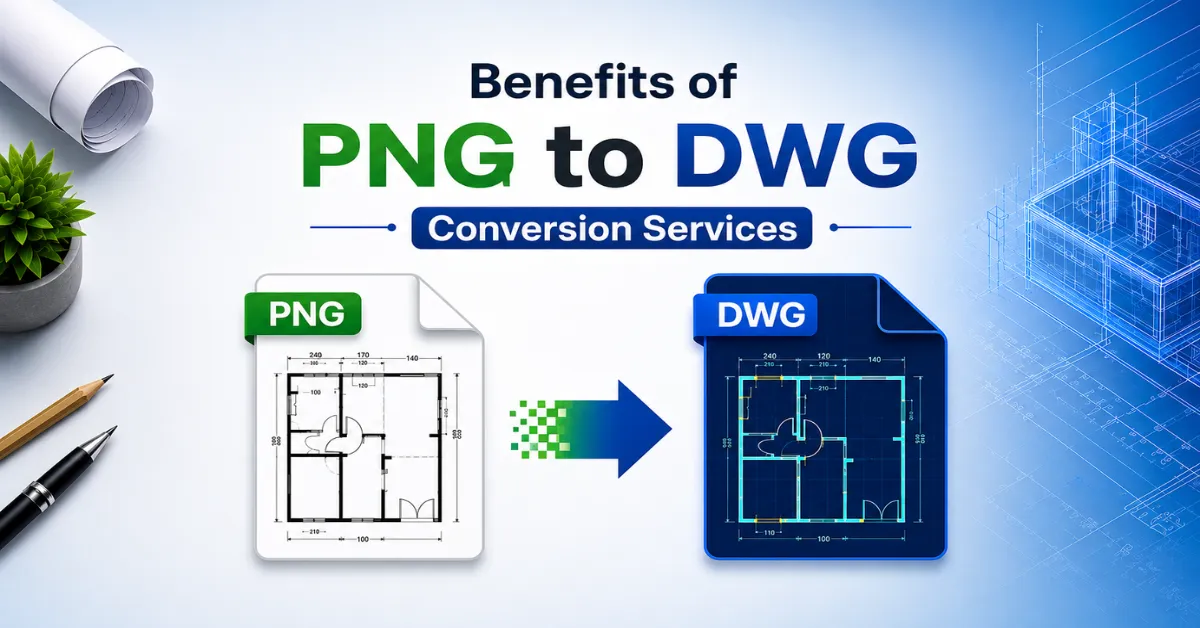
PNG files are raster images composed of pixels. These files are ideal for displaying visual information but lack editable geometric data. DWG files, conversely, are the native language of software like AutoCAD and other drafting setups. They store information as mathematical vectors, meaning you can revise lines, pull dimensions, and adjust geometry with absolute pinpoint precision.
Executing a PNG to AutoCAD Conversion means manually tracing or vectorizing flat pixel data into true engineering elements like lines, arcs, curves, text boxes, and dimension strings. Once that process is done, you are left with a fully functional design file instead of a rigid photo.
A ton of businesses are still sitting on folders packed full of old scanned prints and image-based layouts. Moving these assets into a vector format reveals their actual worth and makes them instantly useful for today’s design tools.
Benefit 1: Creation of Fully Editable CAD Drawings
One of the most significant Benefits of PNG to DWG Conversion is the ability to create fully editable CAD drawings.
A basic PNG works exactly like a digital photo. You cannot click and change a specific wall or pipe because the entire thing is just a single sheet of pixels. But once you change it over to DWG, every single line and note turns into its own independent, editable object.
This transformation allows drafting teams to:
- Modify dimensions quickly
- Add or remove design elements
- Update project information
- Adjust layouts without redrawing entire plans
- Maintain drawing accuracy during revisions
Having Editable CAD drawings makes design updates a breeze and stops you from getting stuck in endless manual re-drafting loops. Rather than starting back at square one every time a client makes a change, you can update your vector files in minutes.
This flexibility becomes especially valuable for renovation projects, facility management, infrastructure upgrades, and engineering modifications where drawings frequently evolve.
Benefit 2: Improved Design Accuracy
Precision is always the most important detail in any technical plan. Even a tiny drafting slip-up on a page can snowball into an incredibly expensive nightmare out on the construction field or factory floor.
One of the major Benefits of PNG to DWG Conversion is the ability to improve precision through vector-based drafting.
Vector layouts allow for perfectly scaled dimensions and true mathematical lines. Drafters can double-check clearances, lock in strict office drafting standards, and make sure every single sheet stays completely uniform.
|
Feature |
PNG File |
DWG File |
|
Editable Geometry |
No |
Yes |
|
Precise Measurements |
Limited |
Accurate |
|
CAD Compatibility |
No |
Yes |
|
Layer Management |
No |
Yes |
|
Design Revisions |
Difficult |
Easy |
Since these vector layouts hold up to strict engineering tolerances, your team can lean on the new files with total confidence for master planning, detailed drafting, trade coordination, and record keeping.
Benefit 3: Faster Project Turnaround Times
Every project operates under deadlines. Delays often result in increased costs and reduced productivity.
The Benefits of PNG to DWG Conversion become particularly evident when project schedules are tight.
Sitting down and tracing old picture files by hand can eat up days of productive office time. Turning to specialist teams skips that headache entirely, handing you clean, ready-to-draft files that drop right into your current design setup.
Project teams gain several time-saving advantages:
- Faster design modifications
- Reduced drafting workload
- Quick access to historical drawings
- Efficient document management
- Streamlined project coordination
For organizations handling large volumes of technical drawings, these efficiencies can significantly improve overall project delivery timelines.
As noted in industry guides from Autodesk, shifting to vector-based pipelines directly improves layout accuracy and speed by unlocking highly precise drafting tools and making cross-team collaboration much smoother.
Also read: Why Maintenance Teams Need Updated Single Line Diagrams
Benefit 4: Better Layer Management and Organization
Technical drawings often contain a large amount of information. Without proper organization, managing design files becomes difficult.
One of the overlooked Benefits of PNG to DWG Conversion is improved drawing organization through CAD layers.
DWG files allow information to be separated into structured layers. Different layers can represent:
- Walls
- Electrical systems
- Plumbing layouts
- Structural components
- Text annotations
- Dimensions
This layered approach creates cleaner drawings and simplifies collaboration among different disciplines.
When you need to make quick revisions, you can isolate specific layers and adjust them without messing up the rest of the layout—a level of workspace control that is simply impossible with flat image files.
Benefit 5: Enhanced Compatibility with CAD Software
Modern design environments rely heavily on CAD applications.
PNG images can be viewed across devices but offer limited functionality within engineering workflows. DWG files, however, integrate seamlessly with various CAD platforms.
The Benefits of PNG to DWG Conversion include compatibility with:
- AutoCAD
- DraftSight
- BricsCAD
- MicroStation
- Civil engineering software
- BIM platforms
This compatibility allows project stakeholders to share, edit, review, and coordinate drawings efficiently.
Companies that make consistent use of CAD file conversion enjoy a lot more breathing room and agility when sharing files back and forth with outside experts, builders, clients, and project directors.
Also read: Manual vs Automated PDF to DWG Conversion: Which Is Better?
Benefit 6: Cost Savings Through Reusable Drawings
Businesses constantly look for opportunities to reduce operational expenses.
One of the most practical Benefits of PNG to DWG Conversion is the ability to reuse existing drawings instead of recreating them repeatedly.
Archived drawings often contain valuable design information. When converted into DWG format, these assets become reusable digital resources.
Benefits include:
- Reduced drafting costs
- Lower labor expenses
- Faster revisions
- Better document preservation
- Increased project efficiency
Over time, organizations build comprehensive CAD libraries that support future projects and reduce repetitive drafting work.
Benefit 7: Long-Term Digital Documentation
Technical documentation serves as a valuable business asset.
Plenty of legacy firms own decades worth of physical paper prints, old scans, and giant picture archives. Unfortunately, keeping those old files organized and up to date can turn into a massive logistical hassle.
The Benefits of PNG to DWG Conversion include preserving valuable information in a modern digital format.
DWG files provide:
- Better archival management
- Easier retrieval
- Simplified revisions
- Improved collaboration
- Greater longevity
Digital transformation initiatives often begin with converting legacy documents into usable CAD formats.
Why Professional PNG to DWG Services Matter
Although automated software tools exist, achieving accurate CAD file conversion often requires professional expertise.
Professional PNG to DWG Services typically provide:
- Manual tracing for precision
- Quality assurance checks
- Layer organization
- Dimension verification
- CAD standard compliance
- Fast project delivery
Professional specialists understand engineering requirements and ensure converted drawings meet industry standards.
This expertise helps minimize errors while maximizing the overall Benefits of PNG to DWG Conversion.
Conclusion
The real Benefits of PNG to DWG Conversion go way deeper than just switching up a file extension. You unlock truly Editable CAD drawings, cleaner precision, faster project turnarounds, easier file archiving, total software flexibility, and real financial savings over time.
As modern digital upgrades sweep through the architecture, design, and building trades, changing flat picture files into active vector layers has become a mandatory step for staying productive and efficient.
Turning to Professional PNG to DWG Services helps you extract the actual worth out of old legacy prints while setting up a clean launchpad for new projects. Getting a reliable CAD file conversion lets your crew work smarter, align their workflows, and push jobs forward with real confidence.
If your firm needs dependable, scalable, and high-precision blueprint drafting, right now is the best time to clean out and modernize your old drawing vaults. Reach out to an expert drafting team today to discuss a quote and find out exactly how a clean PNG to AutoCAD Conversion can smooth out your upcoming timelines and deliver real bottom-line value.
Frequently Asked Questions
What are the main Benefits of PNG to DWG Conversion?
The core Benefits of PNG to DWG Conversion line up as building highly Editable CAD drawings, boosting layout precision, cutting out wasted drafting hours, handling design changes easily, opening up software options, and protecting your archive for future usage.
What is the difference between a PNG file and a DWG file?
Think of a PNG as just a picture made out of tiny dots of color, whereas a DWG is a line-based vector file built for engineering software. Vector files allow you to edit geometry, rescale elements, measure clearances, toggle layers, and use advanced structural tools.
Why are Editable CAD Drawings important?
Working with Editable CAD drawings means your engineers can tweak dimensions, rearrange floor plans, drop in text notes, and make fast layout corrections without having to draw the whole thing over again. This keeps accuracy high and wraps up jobs much faster.
How does CAD File Conversion improve project efficiency?
Investing in proper CAD file conversion does away with tedious manual tracing, creates spot-on digital records, makes revision loops easy, and gets everyone on the project team on the same page, leading to a much faster pipeline.
Can Professional PNG to DWG Services handle old scanned drawings?
Absolutely. Turning to Professional PNG to DWG Services can take your oldest scanned prints, hand sketches, structural layouts, field notes, and schematics and turn them into perfect vector files ready for modern design software.
Is PNG to AutoCAD Conversion suitable for construction projects?
Running a PNG to AutoCAD Conversion is incredibly common on building projects because it hands you an adjustable, scalable, and measurable plan that helps with master planning, sub-contractor coordination, building additions, and closeout records.
How accurate is professional PNG to DWG conversion?
Quality translation teams hit incredibly tight precision benchmarks by utilizing manual drafting, running strict multi-step quality checks, double-checking dimensions against written notes, and sticking to industry standards to deliver field-ready assets.