Table of Contents
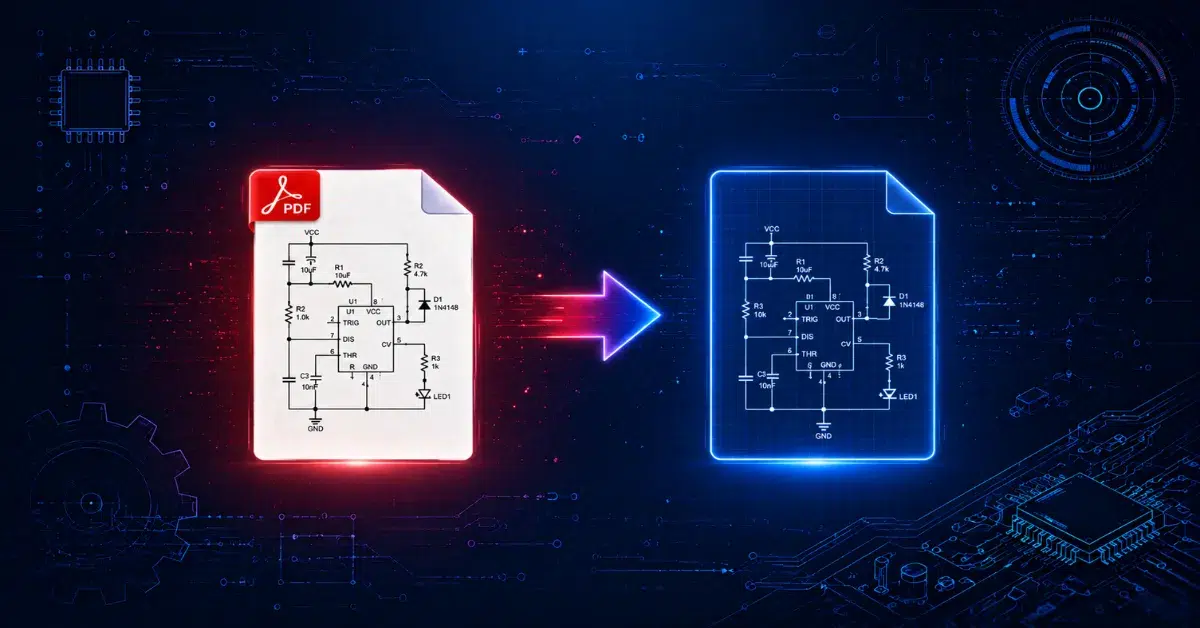
ToggleEngineering projects rarely begin with perfect CAD files. Old blueprints, scanned layouts, hand-marked sketches, and archived drawings still dominate many industries. That is exactly where PDF to CAD Conversion for Engineers completely reshapes the daily workflow.
It is incredibly common for engineers to get floor plans, mechanical layouts, and construction drawings as PDFs. The trouble is, these files put a hard limit on editing, scaling, and redesign flexibility. Switching over to CAD files fixes that headache right away.
Today’s engineering teams lean heavily on precise digital drafting, simply because project timelines are tighter than ever. Dealing with rushed schedules, scattered teams, and constant design changes makes adaptable CAD blueprints essential. Stepping away from unchangeable files removes communication errors and prevents team members from repeating the exact same tasks for PDF to CAD Conversion for Engineers.
A simple scan might seem fine at first, but even one wrong measurement can easily lead to expensive errors down the line during a Benefits of PDF to CAD conversion process. Achieving a perfect file transfer is absolutely essential to keep global engineering teams productive, accurate, and fully aligned.
Why PDF to CAD Conversion Matters in Engineering
Engineers handle technical drawings daily. Unfortunately, PDF files often create workflow barriers because editing them feels like writing on glass with a spoon. CAD files remove that frustration immediately.
In the end, switching these formats changes uneditable files into highly flexible assets. Teams can swiftly modify dimensions, refresh labels, and repurpose old designs rather than starting over from scratch with Engineering CAD solutions.
Mechanical teams depend on these files for precise equipment setups, while civil developers utilize them for infrastructure mapping. Simultaneously, architects use the revised files to keep remodeling projects moving ahead without delays.
Major Benefits of PDF to CAD Conversion
Benefit | Impact on Engineering |
Editable drawings | Faster design revisions |
Better accuracy | Fewer drafting mistakes |
Faster workflows | Meeting project deadlines easily |
Digital archiving | Simplified file management |
Collaboration support | Seamless teamwork across departments |
Modernizing older, historical blueprints is another key area where making this transition offers massive operational advantages for teams. Plenty of firms still have decades-old paper blueprints sitting in storage. Once these are scanned into PDFs, converting them is the fastest way to bring those old assets into the modern digital age.
How PDF to CAD Conversion Works
While the conversion process sounds highly technical on paper, the actual workflow is surprisingly simple. To start, engineers just upload a PDF drawing into their conversion software or hand it off to a team of professional drafters.
From there, the software scans the file to identify lines, arcs, text, dimensions, and symbols, rebuilding the drawing into editable CAD layers. That said, relying purely on automation almost never gives you a flawless result.
Low-quality or grainy PDFs easily confuse automated detection tools, which means scanned files almost always need a bit of manual cleanup and adjustment. Therefore, Manual PDF to CAD drafting remains important for complex engineering drawings.
Typical Conversion Workflow
- PDF drawing collection
- Quality assessment
- Layer recognition
- Vector tracing
- Dimension alignment
- CAD recreation
- Accuracy verification
A clean vector PDF converts faster than a blurry scanned drawing. Because of this extra human touch, project timelines will naturally shift depending on how complex or clean the original drawing is.
For large-scale industrial tasks, engineering firms often blend automated software tools with hands-on manual drafting expertise. This two-pronged method ensures fast delivery without ever sacrificing strict technical accuracy.
If you want to dive deeper into technical drafting standards and best practices for CAD files, this resource breaks down modern industry documentation methods very clearly: Autodesk CAD Standards Guide
Convert Scanned PDF to AutoCAD with Better Precision
Working with scanned documents brings up a unique set of hurdles, mainly because the computer treats them like flat images rather than smart, vector-based drawings. Therefore, software cannot always recognize exact dimensions automatically.
Still, modern tools now handle scanned engineering files much better than older systems. Fortunately, utilizing advanced OCR and vector recognition technologies goes a long way in boosting the overall accuracy of the conversion.
Whenever teams need to Convert scanned PDF to AutoCAD, the initial image quality makes all the difference. Starting with sharp, high-res scans means you get clean lines and face far less tedious cleanup later. On the flip side, faded or blurry blueprints drag teams into hours of frustrating manual clean-up.
Common Problems in Scanned Conversion
Problem | Result |
Low resolution | Broken line detection |
Crooked scans | Scale inconsistencies |
Handwritten notes | Layer confusion |
Smudges or stains | Incorrect geometry |
Facing these kinds of technical hurdles, most engineering outfits outsource large-scale jobs to specialized drafting teams. There is zero room for error when handling intricate structural, electrical, and mechanical layouts.
How Accurate Is PDF to CAD Conversion?
Accuracy remains the biggest concern in engineering drafting. One missing decimal can quietly destroy an entire design process. Therefore, engineers constantly ask: How accurate is PDF to CAD conversion?
The answer depends on three factors:
- Original drawing quality
- Conversion method
- Human verification process
Automated tools can do a decent enough job on basic floor plans, but complex engineering layouts almost always demand a thorough manual review by an experienced eye. Dedicated drafting teams regularly hit accuracy rates above 99% because they take the time to double-check dimensions, align separate layers perfectly, and cross-examine scale references.
Accuracy Comparison Table
|
Conversion Type |
Accuracy Level |
|
Automatic conversion |
Medium |
|
Hybrid conversion |
High |
|
Manual drafting conversion |
Very high |
Keeping the scale consistent is another critical detail. Engineers have to manually verify the units of measurement before pushing any converted file into a live production environment. Because of this, Accurate PDF to CAD conversion always includes quality assurance checks before final delivery.
Benefits of PDF to CAD Conversion for Modern Engineering Teams
Engineering firms now operate under constant pressure. Meeting tight deadlines and turning around overnight client revisions quickly is what really sets your drafting services apart from the competition. Ditching rigid, unchangeable files does much more than simplify quick edits. It actually opens the door to real collaboration, cleans up file organization, and helps your projects scale without the usual friction.
Once converted, these CAD files integrate smoothly with modern BIM platforms, CNC machinery, and structural testing tools. This saves engineers from wasting precious hours on tedious, repetitive drafting loops.
Key Advantages for Engineering Firms
- Faster design modifications
- Better file organization
- Reduced drafting costs
- Improved project coordination
- Easier future updates
Another major benefit comes down to sustainability. Digital workflows reduce paper dependency significantly. That may sound small initially, yet large engineering firms process thousands of drawings yearly.
Therefore, Engineering CAD solutions now focus heavily on digital transformation and smart drafting systems.
How Much Does PDF to CAD Conversion Cost?
Final pricing usually depends on the complexity of the drawings, your deadlines, and specific project needs. A basic floor plan is relatively inexpensive, whereas a complex industrial layout requires a higher level of precision and effort.
A common question clients have is, How much does PDF to CAD conversion cost? Generally speaking, the market pricing tends to break down into three main categories:
Project Type | Estimated Cost |
Simple drawings | Low |
Medium complexity | Moderate |
Industrial layouts | High |
If you are dealing with large-scale projects, you can usually secure bulk pricing discounts, though rushing a job for urgent delivery will likely bump up the final cost a bit.
In the end, investing in professional human drafting services will cost more than running a file through automated software, but the jump in quality is undeniable. However, manual verification dramatically improves engineering reliability. Therefore, many companies view professional conversion as a long-term investment instead of a short-term expense.
Conclusion
Engineering workflows continue evolving rapidly, and digital drafting now drives project efficiency worldwide. Static PDF files no longer support the flexibility modern engineering demands. Looking at how much time you save and the mistakes you avoid, it makes perfect sense that PDF to CAD Conversion for Engineers is now a must-have across modern fields.
Whether you are mapping out a new construction project or configuring factory lines, moving to CAD improves precision, streamlines revisions, and enhances team collaboration. It also prevents design bottlenecks and makes future revisions incredibly easy.
Businesses managing old paper blueprints, hand-drawn sketches, or legacy technical documents can benefit immensely from a reliable transformation workflow. Clean digital files ensure that engineers, architects, builders, and project heads stay completely on the same page. Professional conversion services also reduce costly drafting mistakes. That alone can protect both project budgets and timelines.
Need precise engineering drafting support? Contact a professional CAD conversion specialist today and get a quote for fast, scalable, and accurate engineering CAD solutions.
Also read: Common Errors in PDF to CAD and How to Avoid Them
Frequently Asked Questions
Can scanned PDFs be converted to CAD files?
If you wonder Can scanned PDFs be converted to CAD, the answer is yes, by pairing text recognition software with careful manual tracing. Getting a clean, sharp original scan always ensures far better precision and cleaner output files.
Why do engineers use CAD conversion services?
When asking Why do engineers use CAD conversion, they rely on these workflows to update drawings fast, meet tight deadlines, eliminate repetitive drafting, and integrate older tech documentation into modern production environments.
How accurate is PDF to CAD conversion for engineering projects?
Expert services regularly hit over 99% accuracy. Even so, the final quality depends heavily on how good the original file is, how well the scale is set, and how carefully everything is checked.
Which software is best for PDF to CAD conversion?
If you are trying to figure out Which software is best for PDF to CAD conversion, the standard options include AutoCAD, Scan2CAD, DraftSight, and SolidWorks. Your ultimate pick depends entirely on your unique engineering requirements, drafting guidelines, and project targets.
How much does PDF to CAD conversion cost?
For those wondering How much does PDF to CAD conversion cost, the pricing varies based on drawing complexity, turnaround times, and the level of precision required. Basic outlines are inexpensive, whereas complex industrial schematics demand a larger budget.
What are the benefits of PDF to CAD conversion?
The primary advantages of utilizing an Accurate PDF to CAD conversion include effortless editing, better collaboration, faster project delivery, fewer drafting mistakes, secure digital archiving, and painless design updates down the road.
Is manual PDF to CAD drafting better than automatic conversion?
Relying on Manual PDF to CAD drafting ensures superior precision for intricate engineering work. While automated tools accelerate the timeline, you still need human oversight to verify scales and ensure absolute technical accuracy, which answers How accurate is PDF to CAD conversion.